
 Author
Osman Basaad
Business & Entrepreneurship Writer
Osman Basaad writes about business,
entrepreneurship, startups, innovation
and technology, focusing on clear,
practical and useful information for
modern entrepreneurs and business readers.
Author
Osman Basaad
Business & Entrepreneurship Writer
Osman Basaad writes about business,
entrepreneurship, startups, innovation
and technology, focusing on clear,
practical and useful information for
modern entrepreneurs and business readers.
 Content Reviewer
Inzemam Ul Haq
SEO, Digital Marketing &
Business Development Professional
Inzemam Ul Haq is a Content Reviewer
with 5+ years of experience in SEO,
digital marketing and business development.
He reviews content for clarity, relevance
and usefulness for readers.
Content Reviewer
Inzemam Ul Haq
SEO, Digital Marketing &
Business Development Professional
Inzemam Ul Haq is a Content Reviewer
with 5+ years of experience in SEO,
digital marketing and business development.
He reviews content for clarity, relevance
and usefulness for readers.
Last Updated: October 15, 2026
Node.js is popular when it comes to web apps, APIs, backend services, command-line tools, and real-time applications. The large community of developers and vast npm package library make Node.js widely used by software developers.
But there is still the issue of Node.js security that needs to be considered by companies using Node.js. It can be a matter of the vulnerabilities of the Node.js runtime itself, third-party packages, application dependencies, configuration, and the development process.
By following Node.js security news, you will get knowledge about new vulnerabilities, security releases, risks connected with application dependencies, and some best practices to follow.
In this guide, we will cover all the main points about Node.js security that you need to know as a developer.
Table of Contents
What Is Node.js Security News?
Node.js security news means news connected with the security of the Node.js runtime and applications built with it.
It can be:
- Newly discovered vulnerabilities
- Node.js security releases
- Npm package vulnerabilities
- Dependency risks
- Authentication vulnerabilities
- Remote code execution vulnerabilities
- Denial-of-service vulnerabilities
- Security advisories
- Patching recommendations
- Application security best practices
The information regarding security can change rather quickly, so when dealing with a newly reported vulnerability, developers need to check official Node.js security advisories and other security sources.
Why Node.js Security Matters
An application built with Node.js can use dozens and even hundreds of packages from external sources. It forms a big supply chain of software. Even though the application code itself was written very carefully, a vulnerable dependency can introduce security issues into your application.
For instance, your app uses the package to:
- Authenticate
- Process images
- Access the database
- Upload files
- Send API requests
- Log something
- Validate data
In case of a vulnerability in the package, you will be in trouble too.
That is why Node.js security requires attention not only at the application level but also at the dependency level.
Common Node.js Security Risks
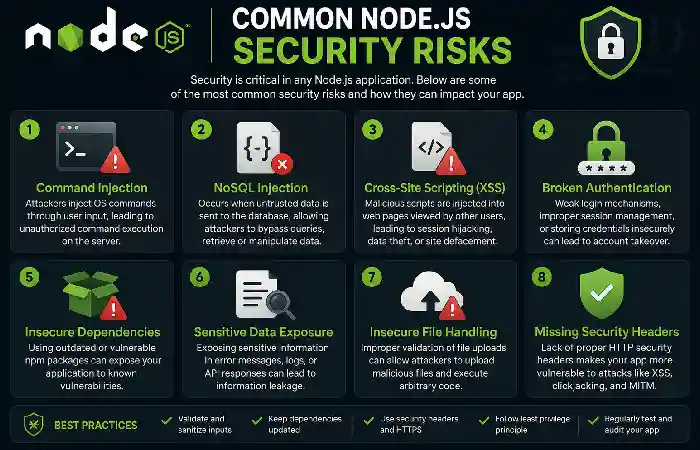
Developers need to be aware of some common security risks when working with Node.js.
| Security Risk | Potential Impact |
| Vulnerable dependencies | Attackers may exploit known package vulnerabilities. |
| Injection attacks | Unauthorized commands or queries |
| Broken authentication | Unauthorized account access |
| Poor input validation | Malicious input reaches application logic. |
| Exposed secrets | Credentials or API keys may be compromised. |
| Insecure configuration | Unnecessary services or permissions remain available. |
| DoS vulnerabilities | Application availability may be affected. |
| Supply-chain attacks | Malicious or compromised packages can enter projects. |
Node.js Security Releases
Security patch releases of Node.js are critical for building a secure system. Having resolved the problem, a developer may want to update their Node.js version. Here is where an error may happen – the developer might decide not to do that because everything works just fine with the current runtime.
Indeed, everything may work fine, but it does not necessarily mean that it is secure.
Steps for a security patch should include:
- Reviewing the supported Node.js version.
- Reviewing security advisories.
- Testing the update in the development environment.
- Updating dependencies.
- Running automated tests.
- Deployment of the new version.
- Monitoring the application after deployment.
Why Node.js Version Matters?
Each Node.js release has its lifecycle.
Using an unsupported or outdated Node.js version results in increased maintenance costs and, of course, higher security risks due to missing necessary updates.
The developers should come up with a strategy for how to maintain the production Node.js installation during its supported lifetime cycle.
Before updating your application, make sure that it has been properly tested, as some changes in the runtime might cause compatibility issues.
npm and Supply Chain Threats
The npm registry is one of the greatest assets of the Node.js ecosystem.
At the same time, it raises quite a number of supply chain problems.
There are many packages installed in your application, and each of them has its dependencies.
This way, you have a dependency graph.
For instance:
Application → Package A → Package B → Package C
Package C can have some problems that might affect your application, although you have never installed it.
That is why dependency management is so critical.
Developers should also stay informed about software supply chain attack news today because compromised packages and dependencies can introduce security risks into otherwise trusted Node.js applications.
Secrets and Credentials Management
All API keys, database passwords, auth secrets, and any other credentials should not be hard-coded. Use proper secret management strategies instead. Also, make sure that there are no sensitive files stored in public repositories.
The examples of such credentials are listed below:
| Secret Type | Example |
| Database credentials | Username and password |
| API keys | Third-party service credentials |
| Session secrets | Application signing keys |
| Cloud credentials | Access keys |
| Encryption keys | Application cryptographic secrets |
Input Validation in Node.js Applications
The apps obtain data from users, APIs, forms, and other external sources. This data cannot always be considered reliable. Data validation will enable making sure that data meets the expected format.
The following examples of data that should be validated are:
- Login forms
- Search fields
- File uploads
- API parameters
- User profiles
- Payment requests
Prevention of the Injection Vulnerability
Injection occurs when commands or queries including untrusted data are executed.
Node.js applications might use databases, operating-system commands, templates, and other systems.
Thus, it is necessary to use parameterized queries, safe APIs, validation, and escaping, and avoid inserting untrusted input directly into commands.
It is important to adjust security measures according to the technologies being used.
Authentication Should Be Secure
Authentication confirms whether the user can access their account.
Thus, the implementation of secure authentication is essential for all Node.js applications.
Secure applications that handle sensitive user information can also benefit from reviewing examples of privacy-focused technology, such as Kogniz contact tracing, when considering data protection and access controls.
Some aspects of secure authentication are:
- Strong password policies
- Password hashing
- Multifactor authentication where possible
- Proper session management
- Account lockout or rate limiting where necessary
- Protection against credential attacks
- Password reset protection
Passwords must never be stored in clear text form.
Session Security
Once the authentication process is completed successfully, applications must manage sessions securely.
Configurations of session cookies must be appropriate.
Depending on the application, the following security-related attributes of cookies could be used:
- Secure
- HttpOnly
- SameSite
Such configuration will help protect against some attacks from the web browser.
Moreover, session identifiers should be unpredictable and properly managed.
Rate Limiting
Automated requests can attack public APIs and login endpoints.
It could be used to reduce the risk of abuse of an app and restrict certain client actions depending on their frequency.
Rate limiting can be helpful in:
- Login endpoints
- Password reset requests
- User registrations
- Search APIs endpoints
- Public APIs
- Expensive operations
Rate limiting should tunes to the traffic patterns of an application.
Secure HTTP Headers
HTTP security headers can be utilized to add some extra security to web applications.
Security headers that may be used depending on the application may be related to:
- The Content Security Policy
- Transport security
- Clickjacking protection
- Content-type
- Referrer
HTTP security headers cannot replace the secure application itself, but can help with additional security of the application.
File Upload Security
File upload security needs special consideration from the developer.
Some of the things that have to consider when working on file upload are:
- File type validation
- File size limitations
- File name handling
- File storage location
- Malware scanning if necessary
- File access control
- Avoiding the possibility of executable file upload
File safety cannot determine only using the file name extension.
Error Handling
Useful detailed error messages may uses during development, but in production mode, such error messages can lead to leakage of sensitive information.
For example, the application should not show the following information:
- Database credentials
- File path
- Stack traces
- Internal service information
- Authentication information
The error response in production mode has to have useful information for the user, but no other sensitive information has to be shown.
The detailed information about the error can be safely logged in the application logs.
Logging and Monitoring
The security process does not end with the deployment of the application.
Monitoring of the application is necessary for detection of any suspicious activity.
Alongside application monitoring, developers should also investigate infrastructure-related issues such as DNS delays, and how to fix slow DNS lookup can help identify common causes of slow DNS resolution.
Here are some of the events that may monitor:
- Suspicious logins
- Suspicious password reset requests
- Suspicious permission changes
- Suspicious API calls
- Application errors
- Suspicious traffic
- Suspicious admin activities
The logs have to protect because they may include sensitive information.
Node.js Security for Developers
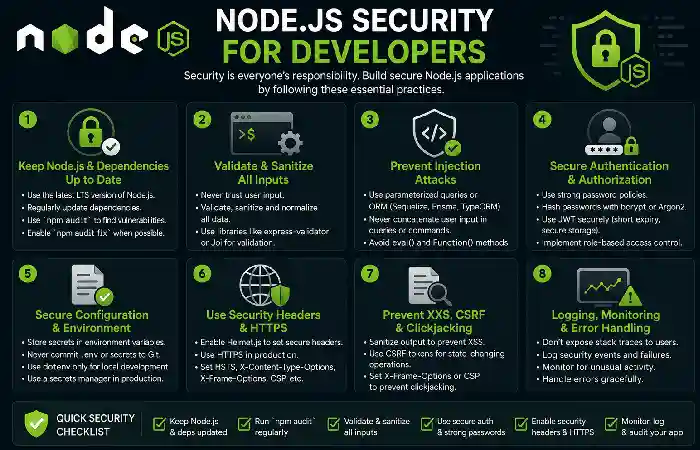
Developers can create more secure applications by adding some security features while developing them.
Here are the useful steps of the process:
| Development Stage | Security Practice |
| Planning | Identify security requirements |
| Coding | Follow secure coding practices |
| Dependencies | Review packages |
| Testing | Perform security testing |
| Deployment | Secure configuration |
| Monitoring | Watch application activity |
| Maintenance | Apply security updates |
Security should not be treat as a final step immediately before deployment.
How to Follow Node.js Security News
It is recommend to use reliable sources when researching possible vulnerabilities.
Relevant sources can include:
- Node.js official security advisories
- npm security advisories
- National vulnerability databases
- Security research organizations
- Vendor security notifications
- Technical magazines
Make sure that the advisory relates specifically to your Node.js version or dependency.
Try to avoid relying solely on information found on social media and in newspapers.
Node.js Security Checklist
A programmer might think of the following checklist:
Runtime
- Use an updated Node.js version.
- Pay attention to security notifications from the authorities.
- Install updates after evaluating security patches.
Dependencies
- Evaluate the versions of the packages.
- Remove unused dependencies.
- Consider potential vulnerabilities.
- Manage the versions of lock files.
Application
- Perform user input validation.
- Protect the authentication endpoints.
- Protect the sessions.
- Set appropriate access control.
- Be cautious about error exposure.
Secrets
- Do not embed credentials in the code.
- Secure the environment variables configuration.
- Update exposed secrets regularly.
- Limit access to production credentials.
Infrastructure
- Use HTTPS.
- Limit unnecessary network connections.
- Keep the operating system security patches up to date.
- Be aware of the logs and the application behavior.
Conclusion
Watching the news about Node.js security is an integral part of modern JavaScript development. The vulnerabilities might appear because of the Node.js runtime itself, npm dependencies, application code, the configuration, the authentication system, and the infrastructure. The constant changes in the Node.js environment call for setting up a regular process of tracking vulnerabilities and addressing them.
Using a supported Node.js version, npm dependencies, secrets, validation, authentication, application security, and timely reaction to advisories will have a positive impact on the application’s security. Eventually, the security of an application should treat as a process, not an action.