
Last Updated: August 23, 2026
Preparation of a professional presentation requires a lot of time, particularly when working from scratch. The use of presentation template websites makes it easier for people to create their own presentations by using pre-made templates, which they can modify and fit for various purposes such as business, educational, marketing, training, and personal.
Slidesgo is an online platform that provides various presentation templates and visual aids that can be used in making presentations. They provide templates that work on platforms such as Google Slides and Microsoft PowerPoint, along with other design tools. (slidesgo.com)
Table of Contents
What is Slides go?
It is a presentation template website that is designed to help users create visually appealing slides more effectively.
It provides presentation templates of various categories and styles. Users are supposed to select one that suits the purpose of their presentation and modify the content, colors, images, typography, and others.
It has various resources that can be used for making professional and educational presentations. (slidesgo.com)
Types of Slides Go Templates
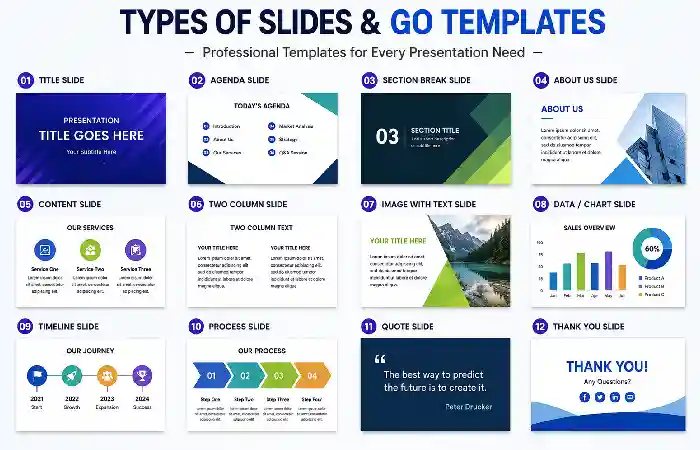
There are various types of Slidesgo templates that can be used to make presentations.
Common categories include the following:
- Business presentations
- Marketing presentations
- Education
- Medical
- Technology
- Pitch decks
- Project proposals
- Infographics
- Workshops
- Training
- Creative presentations
These types allow users to choose a template according to the subject matter and audience.
Google Slides Templates
Google Slides are common because presentations are accessible via web browsers and can be shared among collaborating users.
Slidesgo provides various templates that can be utilized on Google Slides. Users have to choose the template and then make some modifications as per their presentation requirements. (slidesgo.com)
PowerPoint Templates
Microsoft PowerPoint is one of the most popular presentation apps.
Some templates work for PowerPoint on the Slidesgo website, where users can find design samples that they can download and adjust in the Microsoft PowerPoint app. (slidesgo.com)
Usually, users can change text, pictures, layout, and other presentation elements depending on their needs.
Educational Presentations
Often, teachers and students require presentations that are informative and eye-catching at the same time.
There are Slidesgo templates related to educational disciplines and teaching practices that allow users to create educational presentations, presentations for projects, learning materials, etc.
This way, templates may save time, as a design does not need to be made from scratch for every slide.
Business Presentations
Companies may apply presentation templates for various purposes.
For instance, companies may use templates for the following presentations:
- sales presentations;
- marketing plan;
- company profile;
- business proposal;
- project updates;
- strategy presentation;
- financial presentation;
- pitch deck.
Such templates can contribute to making the design look organized and professional.
Marketing Presentations
It is common for marketing teams to use presentations to show their strategies and campaigns, research results, and performance.
The right template will give a user an opportunity to present:
- Marketing research;
- customer profiles;
- campaign plans;
- Marketing funnels;
- performance metrics;
- competitive analysis;
- growth strategies.
Content is what really matters; however, a well-designed presentation can make complicated information clearer.
Infographic Templates
Infographics are used to show data and connections in a visual way.
Charts, diagrams, timelines, icons, and other visuals presented in a presentation template may help users show their information in a non-textual way.
When infographics are used in a presentation, users need to make sure that all charts and statistics are accurate.
Benefits of Using Slides go
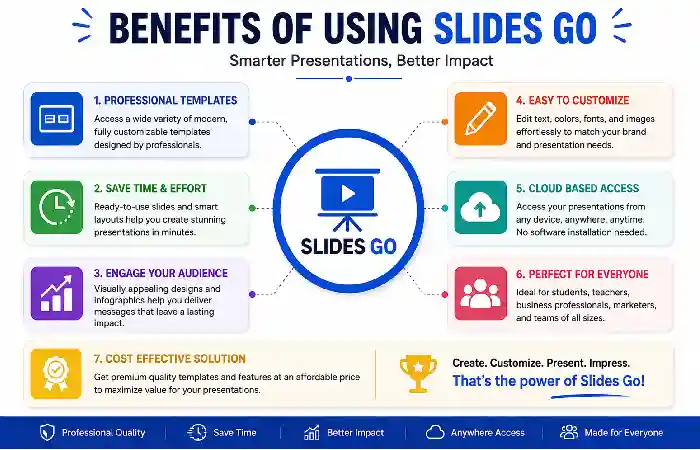
Here are some possible benefits of using a presentation template platform.
Saves Time
With a professionally created template, a user will spend much less time creating the layout of their slides.
Gives Ideas About Visual Design
Templates will help users get an idea about how to structure the information visually.
Different Styles Are Available
A user will have an opportunity to choose templates from simple and professional designs to colorful and creative ones.
Serves Various Needs of Presentations
There are templates for education, business, marketing, technology, and many other fields.
Customizing a Slidesgo Template
It is essential to view the template as a starting point instead of a ready-made presentation.
It is possible to enhance the final output by:
- Replacing all placeholders
- Inserting relevant images
- Changing colors
- Correcting typography
- Reducing overcrowded slides
- Adding charts
- Deleting superfluous items
- Keeping the formatting consistent
Customizing is vital in ensuring that the presentation conveys the particular message to the target audience.
How to Create Better Presentations
Using a template does not mean that one creates an effective presentation.
Keep the Slides Concise
Do not put too much information into a slide.
Visual Hierarchy
Key information must stand out either in terms of size, positioning, or formatting.
Consistent Design
Fonts, spacing, colors, and layouts must be consistent.
Careful Use of Visuals
Visuals must complement the message instead of taking away from the message.
Practice the Presentation
Slides must help the speaker and not take the place of the speaker’s presentation.
Free and Premium Resources
Slidesgo offers both free and premium resources depending on the specific template and resource. It is imperative to check the conditions of the particular template to use the slides for any commercial or restricted purposes. (slidesgo.com)
Licensing is especially crucial for businesses and organizations that use presentations in public or for commercial reasons.
Who Can Use Slidesgo?
Slidesgo might be suitable for a variety of users such as:
- Students
- Teachers
- Business people
- Marketers
- Entrepreneurs
- Trainers
- Consultants
- Designers
- Content creators
Frequently Asked Questions
What is Slidesgo?
Slidesgo is an online service providing templates and visuals for creating presentations. The templates can be applied to Google Slides and Microsoft PowerPoint. (slidesgo.com)
Is Slidesgo free?
Both free and premium templates are available at Slidesgo. It is important for the user to check which license covers the particular template he wants to use.
Can I use Slidesgo templates in PowerPoint?
Some templates are compatible with Microsoft PowerPoint. (slidesgo.com)
Can I use Slidesgo templates in Google Slides?
Some Slidesgo templates are designed specifically for Google Slides. (slidesgo.com)
Who can use Slidesgo?
Those who need to create presentations, including students, teachers, business people, marketers, entrepreneurs, and others.
Can Slidesgo templates be edited?
In most cases – yes. Depending on the particular template and tool used, the user can edit text, layout, graphics, color scheme, and other aspects of the presentation.
Conclusion
Slidesgo provides plenty of templates for creating professional and organized slides without creating each of them manually. Slidesgo templates include various presentation types such as business, educational, marketing, technological, and more.
Depending on the task the user needs to accomplish (class presentation, business presentation, marketing plan, project presentation, etc.), using an appropriate template will save time and help provide inspiration for designing the presentation.